
JulioHerrlein
-
Posts
848 -
Joined
-
Last visited
Content Type
Forums
Events
Store
Video Gallery
Everything posted by JulioHerrlein
-
Send to your email. Thanks
-
I experienced hanging notes with the midi player when clicking in a MIDI file to listen. Could not stop the notes, even with all notes off command.
-
-
-
Opusmodus 3.0 for Windows ( Basic Install and Workflow Setup ) In this video there is a tutorial for the installation and setup of Opusmodus 3.0 for Windows computers. It also shows the Loop Midi Setup and integration with Reaper, Musescore and Libre Office. LINKS OPUSMODUS 3.0 - Windows https://opusmodus.com/forums/downloads/ LOOP MIDI - Virtual Midi ports - Tobias Erichsen https://www.tobias-erichsen.de/software/loopmidi.html REAPER https://www.reaper.fm/ MUSESCORE https://musescore.org LIBRE OFFICE https://www.libreoffice.org/ CHAPTERS 00:00 - Intro 00:59 - Install Opusmodus 02:41 - First Look at Opusmodus Standalone 04:25 - Midi Setup 05:23 - Loop Midi Install 05:53 - Virtual Ports Setup 06:30 - Selecting Midi Inputs and Midi Entry 07:00 - DAW Midi Loop Setup (Reaper) 09:19 - Def-Instrument-set creation and setup midi 11:42 - Preview Score with def-instrument-set using VST and Reaper 12:20 - OMN for creating musical ideas 12:44 - Using the Preview Score with VST sounds in Reaper 14:36 - Opusmodus and Notation Software - Musescore 15:21 - Opusmodus and word processor software - Libre Office
-

Windows Version - Uninstall - Re-Install
JulioHerrlein replied to RST's topic in Support & Troubleshooting
In the next days I´ll do a video about the Windows setup. The uninstall (if necessary) can be done in the Control Panel.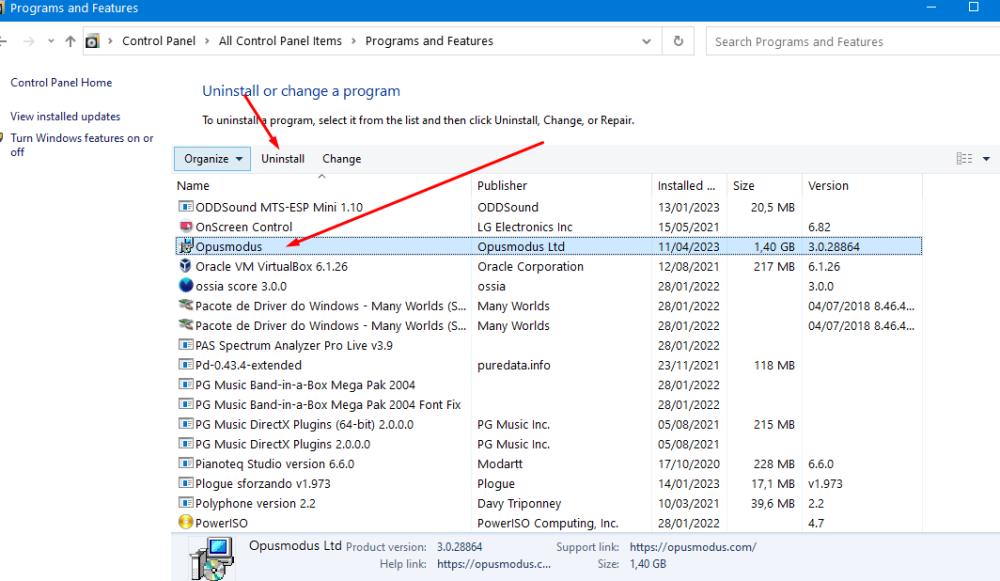
-
Converting MIDI or MusicXML to OMN
JulioHerrlein replied to TomTolleson's topic in Support & Troubleshooting
Yes, I was thinking about this other day... Best ! -
Dear All, What means multi layout ? For multiple instrument / voices ? :group Multi :multi (:layout multi-layout :port nil :channel 2 :sound 'gm :program 0 :controllers nil :pan (pan 0) :volume 92)
-
Thanks, Janusz ! Best !
-
Yes, but I really enjoy more the workflow of PS, because it´s quick and easy to evaluate. So, a sort of "empty-layout" would solve my need. Thanks a lot ! Best
-
(ps 'gm :sq (list vn1 vn2 vla vlc) :tempo 68 :output :audition) What is the solution if I need only the vn1 and vn2 with staves and vla and vlc just sounding without staves ? Can it be done in PS form ? Thanks a lot ! Best, Julio
-
Thanks, Janusz These keywords are already implemented in Opusmodus or will be implemented in the next release ? Best, Julio
-
Dear All, Is there some way to make a ps score with drums (or other instrument) just for hearing but not appearing in the score ? In Def-Score is possible. Is there some kind of layout like "empty-layout" to be used in PS ? Something like (def-instrument-set vst-wind :instruments (:group wind4tet ;optional :vst-flt (:layout empty-layout :port "WIFmidi01" ;here is the midi port name of your system. You can get the name using the (midi-destinations) function :channel 2 :pan (pan 40) :volume 90 ) Thanks a lot ! Best, Julio
-
best strategy for organizing large strings and functions
JulioHerrlein replied to TomTolleson's topic in Library Setup
Dear Tom, You can go like this: (load "/Users/osxname/Opusmodus/Quick Start/name_of_the_file.opmo") Best, Julio -
Revert to Musescore 3 automatic opening in Editor
JulioHerrlein replied to JulioHerrlein's topic in Score and Notation
Thank you ! Best ! -
Revert to Musescore 3 automatic opening in Editor
JulioHerrlein posted a topic in Score and Notation
Dear Janusz, I´d like to have my (musicxml-to editor) function opening in Musescore 3, because I´m not yet using the version 4 because it´s not opening multiple scores at the same time. Each file is a new instance of musescore... please, can you help ? Best, Julio I have a file called SourceCodeJulio.lisp containing the following lines inside the extensions folder, under user source of the Opusmodus main folder. (defparameter *snippet-clef-default* :treble-down8) (defun last-score-to-musescore () (compile-score *last-score* :output :musicxml :file "temp-last-score") (musicxml-to-editor "temp-last-score" :application "/Applications/MuseScore3.app")) (defun last-midi-to-musescore () (compile-score *last-score* :output :midi :file "temp-last-midi") (musicxml-to-editor "temp-last-midi" :application "/Applications/MuseScore3.app")) Also, the function now opens the Musescore 4 but not the temp files -
Translate Hakan Austbo Messiaen Color Catalogue to OM
JulioHerrlein replied to Cliff's topic in Suggestions & Ideas
Dear Cliff, That part of the video (around 5´40) is perfectly doable in Opusmodus. The color stuff is possibly feasible but I don´t know if it would be usable to people that don´t have cinestesic abilities, like Messiaen that could hear in colors. All the best ! -
Thanks ! The merit goes to Stéphane ! I was just trying to help a little. Best ! Julio
-
Translate Hakan Austbo Messiaen Color Catalogue to OM
JulioHerrlein replied to Cliff's topic in Suggestions & Ideas
Thanks, Stéphane !! Best ! -
Translate Hakan Austbo Messiaen Color Catalogue to OM
JulioHerrlein replied to Cliff's topic in Suggestions & Ideas
Dear Cliff, Some time ago (round about 22 June 2021), Janusz was developing a chord variation function that was very interesting. I was helping him to adapt it to the drop-voicing function. The drop-voicing function process existent chords while the original Janusz function prototype was more in the generation of chords. Let´s see if Janusz chime in here and see if he remember that. The function was doing something like this (I don´t have the actual code). The interesting point related to your post goes like the following. It could be interesting to have a function similar to the function Janusz was doing below and also a function to process chords, doing it´s inversions and also normalizing the inversions putting all of the inversions starting in the same note, like the example in the video called: "chords in the inversions transposed on the same bass note" (more or less at 5´40 of the video). This can be really useful in the context of Messiaen-like music, especially to generate colorful chords of 5, 6 or 7 notes, to spread it. This full chords are used by Messiaen in orchestrations. In relation to the colors, if we provide a color for each pitch-class, maybe it´s possible to create a function to generate and calculate an RGB or CMYK code for the chord resultant, like mixing the color of the notes to generate a color code result for pitch classes / chords. RGB Color Codes Chart WWW.RAPIDTABLES.COM RGB color codes chart, RGB color picker, RGB color table. All the best ! Julio (chord-drop '(c5 m/maj9)) ;(0 3 7 11 14) => (d6b5g5eb5c5 d6g5eb5c5b4 d6b5eb5c5g4 d6eb5c5b4g4 d6eb5c5g4b3 d6b5g5c5eb4 d6g5c5b4eb4 d6g5c5eb4b3 d6b5c5g4eb4 d6b5c5eb4g3 d6g5eb5b4c4 d6b5eb5g4c4 d6eb5b4g4c4 d6eb5g4c4b3 d6eb5b4c4g3 d6g5b4eb4c4 d6g5b4c4eb3 d6eb5g4b3c3) (chord-drop '(c5 maj9/s11)) => (get-count '(fs6d6b5g5e5c5 fs6b5g5e5d5c5 fs6b5g5e5c5d4 fs6d6g5e5c5b4 fs6g5e5d5c5b4 fs6g5e5c5b4d4 fs6g5e5c5d4b3 fs6d6b5e5c5g4 fs6b5e5d5c5g4 fs6b5e5c5g4d4 fs6d6e5c5b4g4 fs6d6e5c5g4b3 fs6b5e5c5d4g3 fs6d6b5g5c5e4 fs6b5g5d5c5e4 fs6b5g5c5e4d4 fs6d6g5c5b4e4 fs6g5d5c5b4e4 fs6g5c5b4e4d4 fs6d6g5c5e4b3 fs6g5d5c5e4b3 fs6g5c5e4d4b3 fs6d6b5c5g4e4 fs6b5d5c5g4e4 fs6b5c5g4e4d4 fs6d6b5c5e4g3 fs6b5d5c5e4g3 fs6b5c5e4d4g3 fs6b5g5c5d4e3 fs6g5c5b4d4e3 fs6g5c5d4b3e3 fs6b5c5g4d4e3 fs6b5c5d4g3e3 fs6d6g5e5b4c4 fs6g5e5d5b4c4 fs6g5e5b4d4c4 fs6d6b5e5g4c4 fs6b5e5d5g4c4 fs6b5e5g4d4c4 fs6d6e5b4g4c4 fs6d6e5g4c4b3 fs6d6e5b4c4g3 fs6b5g5d5e4c4 fs6d6g5b4e4c4 fs6g5d5b4e4c4 fs6g5b4e4d4c4 fs6g5d5e4c4b3 fs6b5d5g4e4c4 fs6b5d5e4c4g3 fs6d6g5b4c4e3 fs6g5d5b4c4e3 fs6g5b4d4c4e3 fs6b5d5g4c4e3 fs6d6e5g4b3c3 fs6g5d5e4b3c3 fs6b5d5e4g3c3 fs6g5b4d4e3c3)) (chord-variant '(d4 maj7)) => (d4fs4a4cs5 d4fs4a4cs4 d4fs4a3cs5 d4fs4a3cs4 d4fs3a4cs5 d4fs3a4cs4 d4fs3a3cs5 d4fs3a3cs4) (chord-variant '(d4 maj7) :root :top) => (d4fs4a4cs5 d4fs4a3cs5 d4fs3a4cs5 d4fs3a3cs5 d3fs4a4cs5 d3fs4a3cs5 d3fs3a4cs5 d3fs3a3cs5) (chord-variant '(d4 maj7) :transpose -1) => (d4fs4a4cs5 d4fs4a4c5 d4fs4gs4cs5 d4fs4gs4c5 d4f4a4cs5 d4f4a4c5 d4f4gs4cs5 d4f4gs4c5) (chord-variant '(d4 maj7) :transpose -1 :root :top) => (d4fs4a4cs5 d4fs4gs4cs5 d4f4a4cs5 d4f4gs4cs5 cs4fs4a4cs5 cs4fs4gs4cs5 cs4f4a4cs5 cs4f4gs4cs5) (chord-variant '(d4 maj7) :root :top) => (d4fs4a4cs5 d4fs4a3cs5 d4fs3a4cs5 d4fs3a3cs5 d3fs4a4cs5 d3fs4a3cs5 d3fs3a4cs5 d3fs3a3cs5) -
Thanks a lot, Stéphane ! Great ! Best ! Julio
-
Congrats, Stéphane !! Please, can you share the opmo file ? All the best ! Julio The link provided isn't working.
-
Thanks, Stéphane ! Best !
-
Yes. Thank you.
-
Thanks. It have to be constrained in one octave. I´ll remember to put modus before any octave independent use of tone-row.