
JulioHerrlein
-
Posts
839 -
Joined
-
Last visited
Content Type
Forums
Events
Store
Video Gallery
Everything posted by JulioHerrlein
-
Thanks a lot ! Happy 2023 ! Julio
-
Dear Friends , I have this question regarding Get-Beats Function. All the best ! Julio ;;; THIS WORKS ! (setf omn-forum '((h b4 s d5 mf ord g5 ord c5 ord e. a5 ord s b5 ord e5 ord fs5 ord d5 ord e g5 f stacc c5 stacc a5 stacc - b5 stacc q e5 mf ord)(h bb4 s d5 mf ord gb5 ord c5 ord e. ab5 ord s b5 ord e5 ord fs5 ord d5 ord e g5 f stacc c5 stacc a5 stacc - b5 stacc q eb5 mf ord)) (get-beats '( (1 1 (1 2 4 7 5 8 6 3)) (1 2 (1 2 4 4 4 7 6 3))) omn-forum) ;;; But THIS WON´T WORK - Why ? (setf bts (rnd-unique 8 '(4 7 5 8 3 6 1 2))) (get-beats '( (list 1 1 bts) (1 2 (1 2 4 4 4 7 6 3))) omn-forum)
-

Some differences in the new interface
JulioHerrlein replied to JulioHerrlein's topic in Support & Troubleshooting
Thanks, Janusz ! All the best ! The alias is a great idea ! -
I noticed some differences in the new interface of the workspaces, specially in the way ver 3 deals with the files pinned at the workspace. You can drag your .opmo files onto the workspace from finder but beware of doing it ! The new workspace will create a special folder and the opmo files will be moved to this new workspace folder and no longer appear in a previous workspace. Seems like you can´t share the same .opmo file in two different workspaces. This makes sense but is different from what occurred before. I also deleted a file because I just wanted to remove / unpin it from the workspace, but it ended being removed from hard disk !! So, be careful when reorganizing your new workspaces. I can´t make folders anymore in the workspace (but in the older version, the folders weren´t searchables) . It was difficult to locate something under a folder. Maybe could be interesting to sort the files of the workspace not only in alphabetical order, but also by date of creation / modification. This automatic management of folders and workspaces is very nice but the user must have this behavior in mind while working the files. All the best ! Happy 2023 !
-
Documentation PDF copy paste problem
JulioHerrlein replied to JulioHerrlein's topic in Support & Troubleshooting
Yes. Sometimes, pdf files are arranged in some way it jumps the lines in a strange way, due to the presence of diferent elements, such as images. It happens in other files, like LIPS tutorials, etc. But probably there is a workaround for the next set of documentation, since it not happens in all the files. All the best ! Thank you. -
Documentation PDF copy paste problem
JulioHerrlein replied to JulioHerrlein's topic in Support & Troubleshooting
Thank you. Best ! -
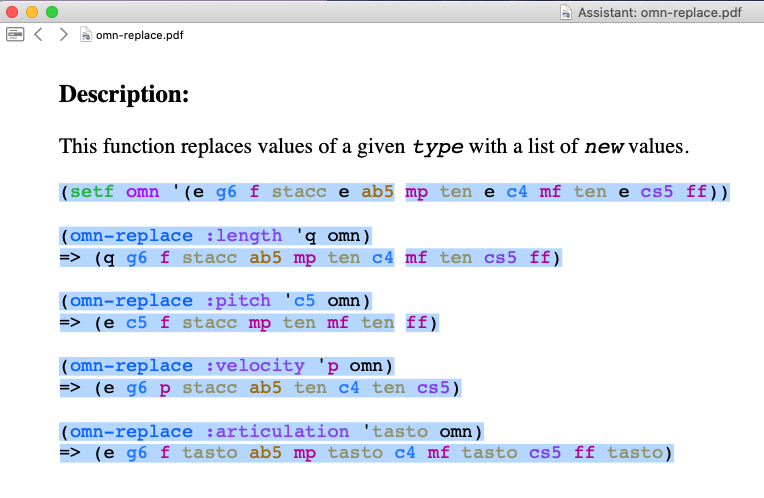
Dear Friends, In many PDF documentation items I found some trouble when copying it from assistant to composer section. Probably due to line breaking formatting, the code sometimes is copied with incomplete lines mixing with complete lines. When copying this: I get this: (setf omn '(e g6 f stacc e ab5 (omn-replace :length 'q omn) => (q g6 f stacc ab5 mp ten c4 (omn-replace :pitch 'c5 omn) => (e c5 f stacc mp ten mf ten (omn-replace :velocity 'p omn) mp ten e c4 mf ten e cs5 ff)) mf ten cs5 ff) ff) => (e g6 p stacc ab5 ten c4 ten cs5) (omn-replace :articulation 'tasto omn) => (e g6 f tasto ab5 mp tasto c4 mf tasto cs5 ff tasto) with different line breaks. All the best ! Julio
-
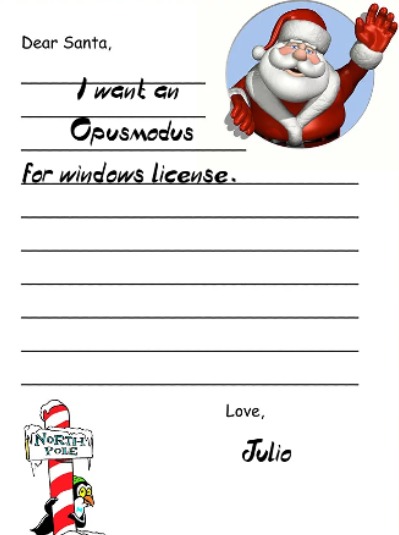
It works with or without SSD. The proper installation, RAM and Virtualization settings are very important. I sent my letter to Santa now !
-
I use with VMware running Catalina now (before it was the old El Capitan), but looking forward to get rid of all that and use it directly in Windows. Since it´s all Lispworks, I think it will look identical or very similar in Windows. Best !
-
Unfold method in ‘om for chord inversion
JulioHerrlein replied to Cliff's topic in Support & Troubleshooting
(pitch-rotate -2 '(b3c4e4g4)) -
Me too !!
-
Opusmodus new version is SO MUCH FASTER !!! It processes the code very fast ! Congratulations ! Best !
-
Opusmodus new version is SO MUCH FASTER !!! It processes the code very fast ! Congratulations ! Best !
-
Opusmodus new version is SO MUCH FASTER !!! It processes the code very fast ! Congratulations ! Best !
-
Marvellous !! Congratulations ! The windows version will be released in 2022 ? Santa Claus is coming to town ! All the best !
-
How to apply different voicings over a chord progression
JulioHerrlein replied to JulioHerrlein's topic in Score and Notation
You got the idea. Best. -
How to apply different voicings over a chord progression
JulioHerrlein replied to JulioHerrlein's topic in Score and Notation
Dear David, Now Opusmodus have a function called drop-voicing that do all the stuff described here. Yes, my book can be very useful for jazz. Here is a testimonial by one of my favorite artists, Ben Monder. Ben played with Paul Motian, David Bowie, Maria Schneider Jazz Orchestra and also The Bad Plus. https://youtu.be/ojWF0B15NmM- 14 replies
-
- 2
-

-
- chord manipulation
- harmony
- (and 2 more)
-
Great !!!!
-
Dear Janusz, I´m very happy to see the screenshots of the new version. Looking forward to have the Windows version ! I have questions regarding the windows version. The questions are: 1) in the windows version there will be the feature of the snippets, like resizing and just touching the snippet in order to copy the notation to the clipboard and then pasting it in a word document or in Inkscape software (or similar vetorial drawing software, like Corel) for further image editing, pasting the result as editable fonts, similar to the way it happens in OSX ? 2) The possibility of opening the snippets in external notation editors, using (musicxml-to-editor) will be available in windows ? 3) Editing the .lisp files for customizing def-libraries, custom instruments, preferences will be possible as in OSX ? I need to tweak some keyswitches in order to get my VST libraries playing the articulations, etc. All the best ! Thank you ! Julio
-
Awesome !!!! Looking Forward !!! Thanks, Janusz !
-
Dear David, Once you figured out the pattern type in terms of integers representing the ascending (positive) or descending (negative) movement, both methods below will do the job for generating symmetric patterns a la Slonimsky´s Thesaurus. Note that there are some repeating patterns in Slonimsky book. For sure, Slonimsky did it all by hand in that time. The interesting thing is the concept, the whole idea of INTER-INFRA_ULTRAPOLATION and the conceptual difference between Scale, as unidirectional and Pattern, as Zig-Zags, alternating ascending and descending movements. By the way, the book is coming !! I´m looking forward to see it, too ! IT´s in the review / translation stage. All the best ! Julio (setf patt '(7 -1)) (setf pitches (gen-sieve '(c4 e6) patt :type :pitch)) or (make-scale 'c4 12 :alt '(7 -1))
-
Dear Andre, Did you used virtualization to run in the M1 computer ? Looks good ! Best, Julio
-
Maybe this one ? UTM | Virtual machines for Mac MAC.GETUTM.APP Securely run operating systems on your Mac
-
How to rewrite example from book that uses omn-dictum
JulioHerrlein replied to jon's topic in OMN Lingo
Yes , Janusz and Jon ! Looking forward to see the new books ! All the best ! Julio -
Dear All, I´m also a heavy user of Opusmodus. My old Macbook Air is broken now and I no longer use Apple products, because I don´t like Apple policies and the programmed obsolescence they use to make. I use windows machines emulating OSX via Virtual Machine. It works perfectly with Opusmodus. Actually Opusmodus is a very light and elegant software. Doing some research, I found that M1 can run virtual machines to install older OSX versions, like in the video below. It can be a temporary alternative if you really need Opusmodus in a hurry. It´s a little tricky, but it works for me. You can run VMware, Virtualbox, Parallels Desktop, Fusion, etc. There are many options. Best You Can Now Run VirtualBox on Apple Silicon (M1 / M2) OSXDAILY.COM Mac VirtualBox users will be happy to know that VirtualBox now runs natively on Apple Silicon ARM processors, including the M1 and M2. VirtualBox is virtualization software that allows you to run o…