

o_e
-
Posts
273 -
Joined
-
Last visited
2 Followers

Recent Profile Visitors
4,526 profile views


-
 Tikov reacted to a post in a topic:
COOL !! - Length Diminution with fractions
Tikov reacted to a post in a topic:
COOL !! - Length Diminution with fractions
-
 o_e reacted to a post in a topic:
How to get time signature to repeat for each list in dictum?
o_e reacted to a post in a topic:
How to get time signature to repeat for each list in dictum?
-
Ok, thanks, I think I don't get what pitch-variation does and what the parameters do. If someone is willing to explain, I would be very greatful, I think I don't have a clue..:-) Thanks!
-
Just play around a little with pitch-variation a little, why does it makes no difference in the output what :type I choose? What am I missing? (setf chords '((h a2a3c4 c4a3a3) (h d4f3g2 f4g3d4))) (pitch-variation 0 1 4 (chord-pitch-unique chords) :type 'c :seed 23) ==>((h a3 c4 a2 a3) (h c4 a3 c4 a3) (h g2 f3 d4 f3) (h d4 f4 g3 f4)) (pitch-variation 0 1 4 (chord-pitch-unique chords) :type 'm :seed 23) ==>((h a3 c4 a2 a3) (h c4 a3 c4 a3) (h g2 f3 d4 f3) (h d4 f4 g3 f4)) (pitch-variation 0 1 4 (chord-pitch-unique chords) :type '? :seed 23) ==>((h a3 c4 a2 a3) (h c4 a3 c4 a3) (h d4 g2 f3 g2) (h d4 g3 d4 f4)) Thanks!
-
hth morse.opmo morse.rtfd.zip
-
o_e reacted to a post in a topic:
Un jardin à Keranchaudel
-
o_e reacted to a post in a topic:
Un jardin à Keranchaudel
-

Documentation PDF copy paste problem
o_e replied to JulioHerrlein's topic in Support & Troubleshooting
Thanks! Is the .rtfd format still possible? -
Documentation PDF copy paste problem
o_e replied to JulioHerrlein's topic in Support & Troubleshooting
I have lots of selfmade docs, which are embedded nicely in the old OM version (by putting them in the ~/Opusmodus/System Library folder). Where do I put them in the 3.x version so I can access them via the search function (There is no System Library folder any more)? And do they have to be in .pdf format (which will make them pretty useless too for me, because I often make new annotations, when calling them)? Thanks for an answer! -
 o_e reacted to a post in a topic:
Parallel Upgrade/Install?
o_e reacted to a post in a topic:
Parallel Upgrade/Install?
-
o_e reacted to a post in a topic:
Opusmodus 3.0 is coming (Intel & M1)
-
o_e reacted to a post in a topic:
Apple M1 Arm processor?
-
o_e reacted to a post in a topic:
Apple M1 Arm processor?
-
o_e reacted to a post in a topic:
Instant No.1 pour Piano (2022)
-
(setf num '(4 3 2 2 3 4 5)) (setf pitch '(a4 b4 c4 d4 e4)) (if (< (length num) (length pitch)) pitch num) =>(4 3 2 2 3 4 5) ;;;;;; (setf num '(4 3 2)) (setf pitch '(a4 b4 c4 d4 e4)) (if (< (length num) (length pitch)) pitch num) =>(a4 b4 c4 d4 e4) hth Edit: I think you need cond to compare the length of three lists with each other: (setf durations '(q e q e s)) (setf chords '(c4e4g4 e4g4c5)) (setf repetitions '(7 1 6 2 5 3 4 4)) (cond ((> (length chords) (and (length durations) (length repetitions))) chords) ((> (length durations) (and (length chords) (length repetitions))) durations) ((> (length repetitions) (and (length chords) (length durations))) repetitions))
-
span is your friend (setf num '(4 3 2)) (setf pitch '(a4 b4 c4 d4 e4)) (span pitch num) ==>(4 3 2 4 3)
-
o_e reacted to a post in a topic:
Distribute Stream option/keyword
-
o_e reacted to a post in a topic:
gen-summationsakkord / claus kühnl
-
Thanks!
-
Hi, it would be nice to have a changelog for the last 2.2.26941 update.. Thanks a lot!
-
Thank you!
-
But I can do something like this and that changes the length of the bar: (dictum '(:any e :apply q) '(e c4 d4 e4 fs4))
-
Is it possible to remove rest(s) with dictum? Thanks! Edit: Why this does not work? (dictum '(:apply (length-rest-remove x)) '(w c5 ped -e))
-
Thank you, I will study that!
-
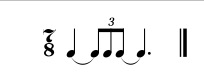
Hi, Is it possible to create compound rhythms like this with ql? (q_3q 3q 3q_q.) Thanks!
-
Thanks Stéphane!