Search the Community
Showing results for tags 'solved'.
Found 6 results
-
Hi, It's likely I'm not fully understanding the integer-to-pitch function in this case, so any help is much appreciated. I have an arbitrary integer sequence with no repeated elements: (setf test-seq '(13 80 61 81 74 72 46 64 31 47 77 22 19 69 7 2 26 71 33 73 59 55 3 39 62 5 65 44 38 49 14 4 52 53 66 57 29 21 6 78 35 10 41 88 76 9 28 8 15 17 43 25 58 42 12 67 70 20 82 87 63 18 56 16 30 34 86 50 27 84 24 45 51 40 75 85 37 36 23 32 60 68 83 11 54 79 48 1)) ; all the notes on the piano ; I can see that the elements are unique: (equalp (length test-seq) (length (remove-duplicates test-seq))) t ; Here's what I'm failing to understand -- (integer-to-pitch test-seq) should not have any duplicates, but it does: (sort-asc (integer-to-pitch *my-log-seq* :quantize 1/2)) (cs4 d4 eb4 e4 f4 fs4 g4 gs4 a4 bb4 b4 c5 cs5 d5 eb5 e5 f5 fs5 g5 gs5 a5 bb5 b5 c6 cs6 d6 eb6 e6 f6 fs6 g6 gs6 a6 bb6 b6 c7 cs7 d7 eb7 e7 f7 fs7 g7 gs7 a7 bb7 b7 c8 c8 c8 cs8 cs8 cs8 d8 d8 d8 eb8 eb8 eb8 e8 e8 e8 f8 f8 fs8 fs8 g8 g8 gs8 gs8 gs8 a8 a8 a8 bb8 bb8 bb8 b8 b8 b8 c9 cs9 d9 eb9 e9 f9 fs9 g9) Perhaps I'm not fully understanding integer-to-pitch. Is there a better function I can use to map an integer to a unique pitch? Many Thanks, Paul Marquardt
-
Is there any possibility to force a brownian motion to be reflected within a lower and an upper (maybe even changing) limit? Thanks for suggestions. Achim
-
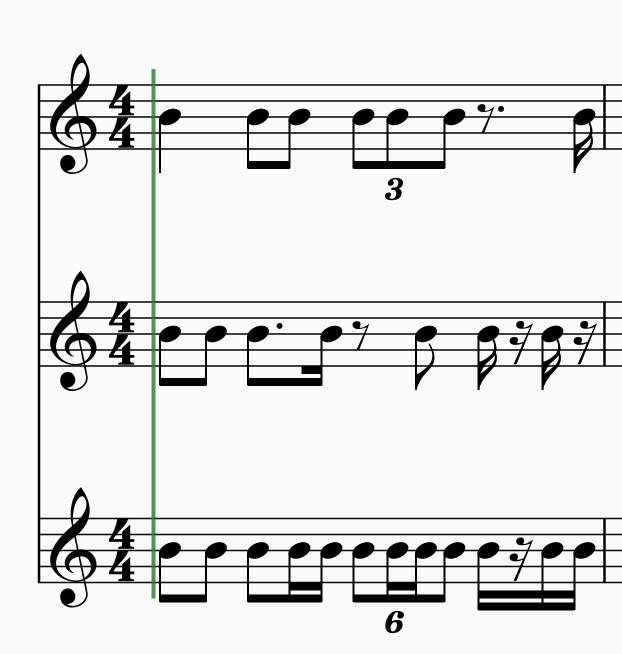
Hi all, is there a function/ method to merge several rhythms into one which is displaying all the onsets of these rhythms. Here the first two systems are merged into the third. Thanks for help. Achim
-
Does anybody have an idea, how to loop through a directory and writing the content of a textfile (like the one attached) without the semicolons into normal lists? Thanks for help. Achimch1-amp-envs.txt
-
solved [SOLVED] Idea for a Rhythmic Set Theory Function
JulioHerrlein posted a topic in Function Examples
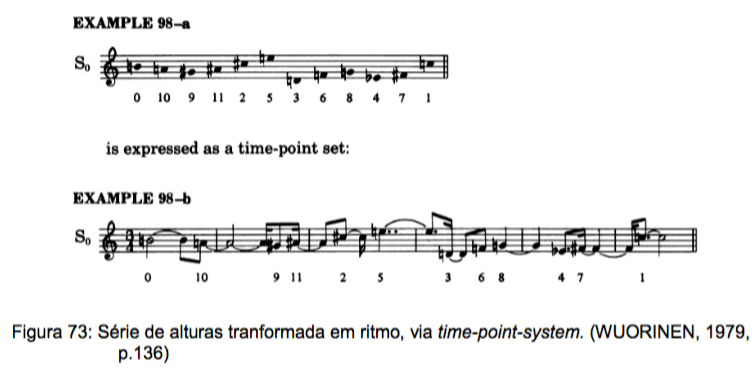
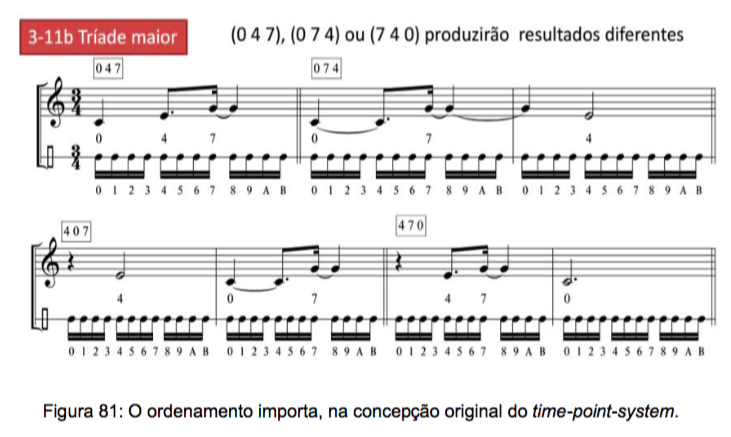
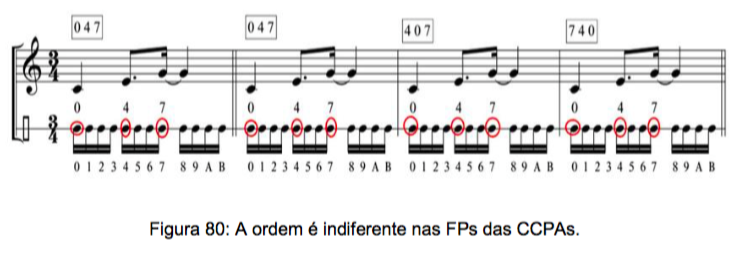
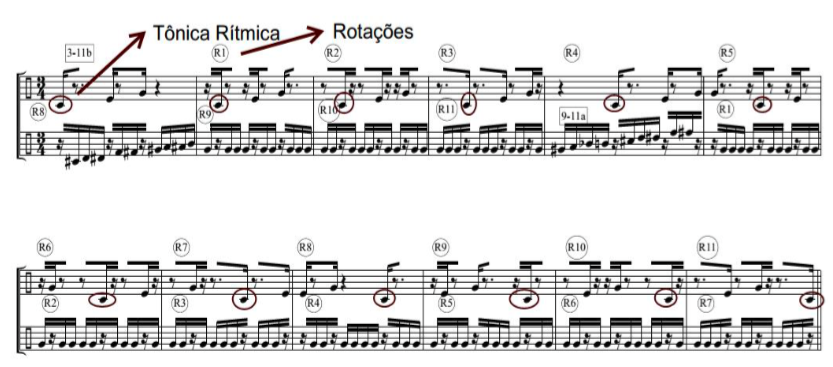
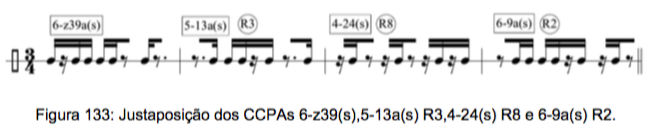
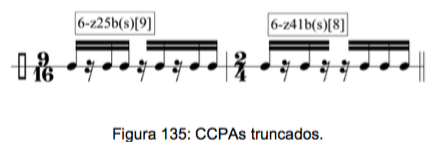
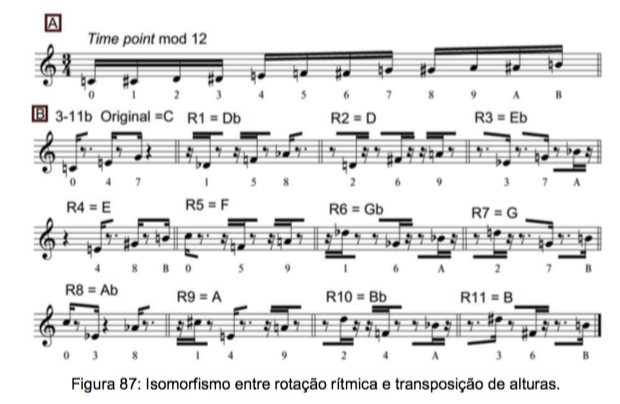
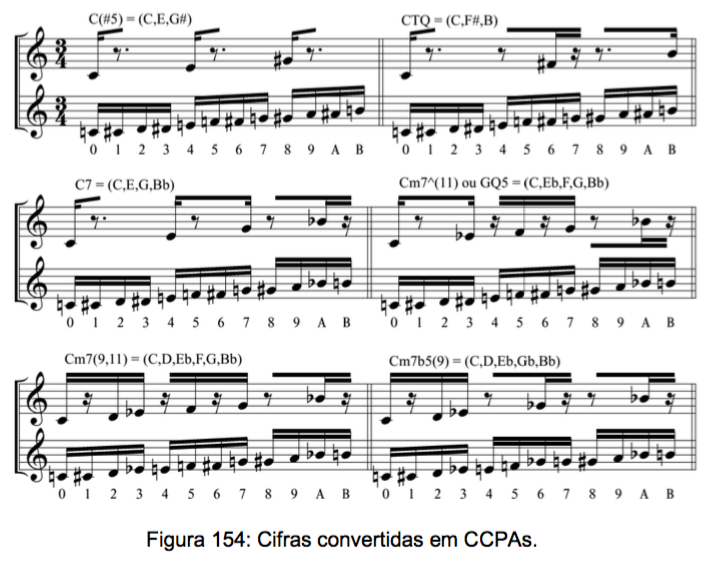
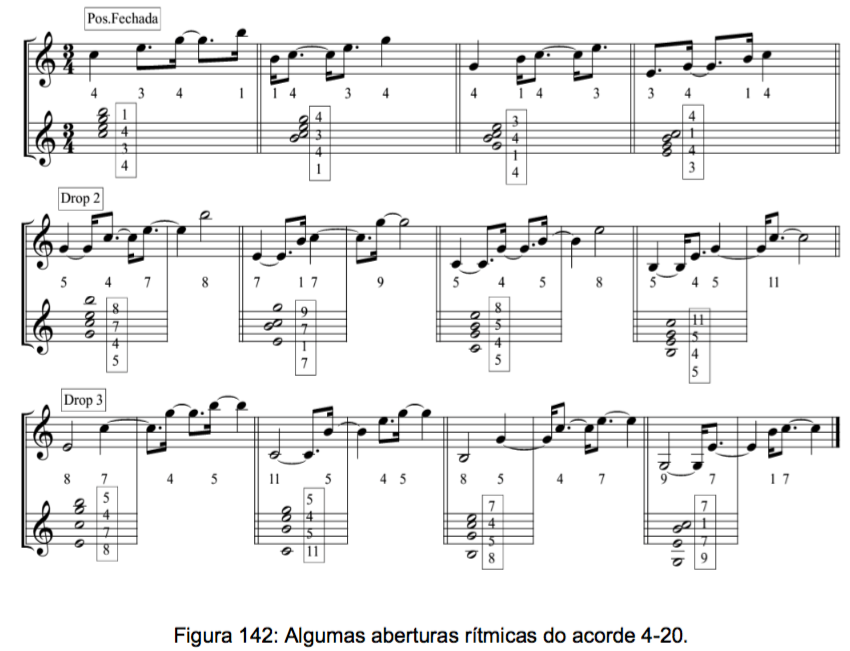
In my Dissertation, I worked a way to convert every chord and set in a modulo 12 rhythm, so the entire catalog of FORTE are converted to rhythms, following the steps of Babitt: As a hardcore serialist, Babbitt was interested in converting 12-tone rows to rhythms, in a kind of 12-tone rhythm theory. Below, Wuorinen show one example of a typical Babbitt idea: For the sake of explaining my idea of function, it's important to have in mind that for Babbitt, the order of the row is very important and lead to different results in the pitch to rhythm conversion. Take a look in the example below: In the preceeding figure, the order of the C major triad generate different rhythms. In the example (0 4 7) have a different result from (4 0 7) or (7 0 4). In the system I developed in my Dissertation, the order does NOT matter, since (0 4 7), (7 0 4) or (4 0 7) will result in exactly the same rhythm, as you can see below: In my system, the transposition equals rotation (as well as in Babbitt) And every chord symbol can be transformed in a rhythm: Even voicings can be converted in longer Rhythms (the more spread the voicing, the longer the rhythm): So I did every FORTE SET in the catalog, in this way: Below, you can see the example of the rhythm of the major triad (Forte number 3-11b). In the 1st bar there is the prime form (0 4 7). In each subsequent bar there is a rotation of the first set by 16th note increments. HERE IS THE POINT, for the sake of the new function ! The note C (that I call Rhythmic Fundamental, the "root" of the rhythm) is being displaced, as you can see in the circled notes. THE SET WRAP AROUND ITSELF, always forming 12 time-points (always twelve 16th notes), in a different way from Babbit, where the order of the sets generates longer rhythms. THIS WAY IS MORE INTERESTING For Popular and Minimalist Repetition Music, as well as 12 tone music. In the bottom staff, there are the complementary rhythm of the 3-11b set, i.e., the 9-11a set. In the catalog, every set is presented alongside its complementary set and every set is presented in 3/4 (16th notes) and in 12-8 (with the 8th note as the base value for the increments and rotations). So the function needed would be the one that mirror exacty this kind of conversion, not the tradicional time-point-system conversion, so I could use my catolog inside Opusmodus, connecting the diferent sets, like this: Or even using portions of the Rhythmic Sets, by truncating some of them, like this: In the preceeding example, only parts of the 2 sets are used (9 time points out of 12 in the first and 8 time points out of 12 in the second). So, I hope someone could help me to find a way of implementing this. Maybe Janusz or Stephane could find interesting to develop this kind of idea inside the software. All the best ! Julio Herrlein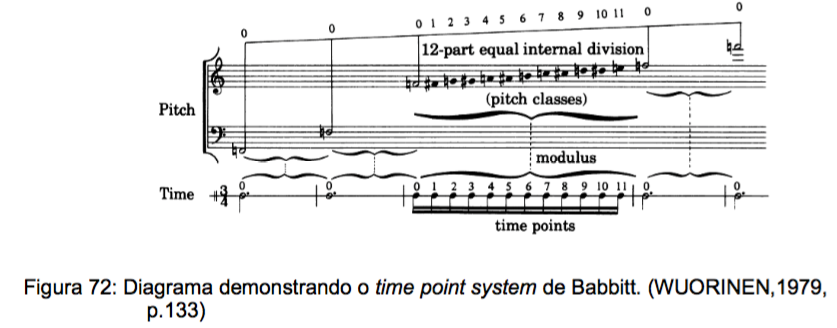
- 40 replies
-
- 1
-

-
- pitches-rhythm isomorphism
- toussaint
- (and 6 more)
-
Hi, I am happily exploring the demo of Opusmodus and have come across some specific? issues to my machine set-up (Mac Pro Mid 2009/OSX 10.9.5). 1- I use a program called 'Total Spaces2' to organize separate desktops. This is the first time it's default key commands of Command 1~9 have caused a problem but when I try to use the Opusmodus key commands for 'Snippet' auditioning, etc ('command' + 1~9) it triggers a TotalSpaces2 desktop change instead. As I use TotalSpaces2 99.9% of my day and have long term muscle memory for it's assignments, I need a way to have different key commands for the 'Snippet' auditioning if possible? Is there a Opusmodus preference file I can alter?? (I don't see anything in the 'Editor Commands' if that is the normal place for making/changing assignments). 2- I am unable to stop normal 'Audition' operation? Using 'command .' and command ,' or the 'Tools' menu versions of 'Interrupt' or 'Break' ALWAYS creates a 'Beachball of Death' and either an app crash or freeze requiring 'force quit'. I have crash reports if you want to give me the desired address to use to report. If I audition to the MIDI player then 'space bar' works as expected to start/stop, but 'Audition' and 'Audition/Notation' processes seem to have no way to be stopped other than finding a new code excerpt to send to 'Audition' process to override current 'Audition'. 3- I also had repeatable crashes when attempting to audition a list created by the 'permute n' function. I used 'permute n 8'...which is 40320 permutations I believe, so I realize this is a large amount of data. I was able to produce the integer data in the 'Listener', used 'copy/paste' to transfer to a list for processing by 'Integer-to-pitch', then used that data (again from 'Listener' via 'command E' to insert into my score as a pitch variable's list' It is THEN, when I try to evaluate/audition my score's omn sequences that Opusmodus just outright crashes. If there a known virtual memory limit involved here? I can produce this list as either integers or converted to pitches, and copy/paste both within and to external apps (like text editor 'Text Wrangler') but cannot evaluate/audition or create MIDI from the data. It is a time consuming operation so i know it's a immense data set, but was surprised that instead of just taking a long time it completely crashes program? Crash report also available upon request. I have 2 x 2.66 GHz Quad-Core Intel Xeon with 16 GB 1066 MHz DDR3 ECC. FWIW, I SUCCESSFULLY used above process/score document to do 'permute n 5', permute n 6', and 'permute n 7'...so it was that jump from 5040 events (n 7) to 40320 that hits some sort of virtual memory wall? Update: As a test, I was able to use 'TextMechanic' online permutation generator to produce a permutation of 8 items, copy/paste into 'Text Wrangler' (to massage format), and then paste into Intermorphic's 'Noatikl''s 'Pattern' Voice (which interprets integers 1~8 as relative intervals) and was able to successfully convert with 'MIDI Cooker' offline feature. All steps did exhibit long processing times in between steps but DID eventually create a MIDI file...so the large amount of data in memory alone isn't the issue (or wasn't with these particular apps). 4- In the 'Introduction to Opusmodus', it states: "The tutorial resources can be accessed from within Opusmodus itself. You’ll find Quick Start, a guide providing the necessary basics. Then there is Stages: a 30-part collection of score-scripts and text commentaries designed to be opened simultaneously. Both these are available as a download: a PDF file formatted as a printable A4 book." I have located the 'Quick Start' PDF, but would really like the 'Stages' as 'nightstand' material (in my case my iPad ;-)), but only see the individual rtfd's for 'Stages' as opposed to the above referenced 'Both these are available as a download: a PDF file formatted as a printable A4 book." Update: I have since created my own PDF of 'Stages', so unless there is a version that includes the actual score information as examples within the textual narrative then I'm good :) In closing, a Opusmodus purchase is definitely in my future, the online documentation and program organization is a real resource to opening up this composing approach, I am truly excited about the seemingly endless possibilities Opusmodus will provide for a very long time ;-) Thanks in advance One final note, a small typo I stumbled across in 'Interval-Row-Invert'...the word ''two' instead of 'row'? (see attached)