
fdsdb
-
Posts
7 -
Joined
-
Last visited
-
 opmo reacted to a post in a topic:
Troubleshooting with 3.0.29282 version - RESOLVED
opmo reacted to a post in a topic:
Troubleshooting with 3.0.29282 version - RESOLVED
-
resolved Troubleshooting with 3.0.29282 version - RESOLVED
fdsdb replied to fdsdb's topic in Support & Troubleshooting
Hi, I have resolved copying a precedent version of SeeScoreLib, compiled for OsX 10.12, into new Opusmodus.app. Best Fabio -
resolved Troubleshooting with 3.0.29282 version - RESOLVED
fdsdb replied to fdsdb's topic in Support & Troubleshooting
Little integration: I have run Opusmodus by Terminal, this is the output trying to have a Notation Snippet: MacBook-Pro-di-Amministratore:~ fabio$ /Applications/Opusmodus.app/Contents/MacOS/Opusmodus ; exit; dyld: lazy symbol binding failed: Symbol not found: ____chkstk_darwin Referenced from: /Applications/Opusmodus.app/Contents/Frameworks/SeeScoreLib.framework/Versions/A/SeeScoreLib (which was built for Mac OS X 11.0) Expected in: /usr/lib/libSystem.B.dylib dyld: Symbol not found: ____chkstk_darwin Referenced from: /Applications/Opusmodus.app/Contents/Frameworks/SeeScoreLib.framework/Versions/A/SeeScoreLib (which was built for Mac OS X 11.0) Expected in: /usr/lib/libSystem.B.dylib If I am reading good, the problem is in SeeScoreLib that has been built for OsX 11.0. But the requirements specified on the site are macOS 10.12 · 11 · 12 · 13 · 14 . Thanks in advance Fabio -
Hi All, I have just updated to last version, and now I receive an error every time I try to create a Snippet of type cmd-1 or cmd-2 (Notation or Voice Notation). This is the Listener output: audition-musicxml-omn-snippet Error: Abort(6) [code 0] at 11A84A256 {outside Lisp heap} rax 2000209 ; rbx 4 ; rcx 70000A5C39B8 ; rdx 70000A5C3E30 rsp 70000A5C39B8 ; rbp 70000A5C3A10 ; rdi 6 ; rsi 4 r8 70000A5C3A30 ; r9 0 ; r10 9E ; r11 246 r12 9E ; r13 70000A5C3E30 ; r14 6 ; r15 0 1 (abort) Abort display notation. 2 Return to top loop level 0. Type for backtrace or :c <option number> to proceed. Type :bug-form "<subject>" for a bug report template or :? for other options. OM 8 : 1 > How can I resolve? I am on OsX 10.13, High Sierra, MacBook Pro (13-inch, Mid 2012), 2,5 GHz Intel Core i5. Is it possible to downgrade while waiting for a solution? I can not find any previous version downloadable file. Many thanks in advance, ciao Fabio
-
 opmo reacted to a post in a topic:
CLM, SC and system sample rate
opmo reacted to a post in a topic:
CLM, SC and system sample rate
-
Hi All, I am on OsX 10.13.6, High Sierra, I have encountered a phenomenon that I think can be useful to share: in using CLM code, the system sample rate setting sets to 48000, so if after that I use SC code I have errors and it does not run. So it is necessary to go to system settings and set again the sample rate to 44100. You can use MIDI Audio Setup --> Audio devices for that. Best Fabio
-
Perfect, thank you very much, all my Best, ciao Fabio
-
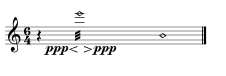
Hi All, I apologize in advance if off topic or already resolved somwhere (I have not found anything). I am using this notation: (setf cell8 '(-q w e6 ppp<>ppp trem+nh-d -q)) to obtain a single whole note with diamond head, inside two quarter rests. However I obtain a wrong result and I don't know how to obtain final quarter rest in the place of another diamond note; here is the wrong result: Thank you in advance, ciao Fabio