

JulioHerrlein
-
Posts
806 -
Joined
-
Last visited
Content Type
Forums
Events
Store
Video Gallery
Posts posted by JulioHerrlein
-
-
Opusmodus new version is SO MUCH FASTER !!!
It processes the code very fast !
Congratulations !
Best !
-
Opusmodus new version is SO MUCH FASTER !!!
It processes the code very fast !
Congratulations !
Best !
-
Opusmodus new version is SO MUCH FASTER !!!
It processes the code very fast !
Congratulations !
Best !
-
-
You got the idea. Best.
-
Dear David,
Now Opusmodus have a function called drop-voicing that do all the stuff described here. Yes, my book can be very useful for jazz. Here is a testimonial by one of my favorite artists, Ben Monder. Ben played with Paul Motian, David Bowie, Maria Schneider Jazz Orchestra and also The Bad Plus.
-
Great
 !!!!
!!!!
-
Dear Janusz,
I´m very happy to see the screenshots of the new version. Looking forward to have the Windows version !
I have questions regarding the windows version.
The questions are:
1) in the windows version there will be the feature of the snippets, like resizing and just touching the snippet in order to copy the notation to the clipboard and then pasting it in a word document or in Inkscape software (or similar vetorial drawing software, like Corel) for further image editing, pasting the result as editable fonts, similar to the way it happens in OSX ?
2) The possibility of opening the snippets in external notation editors, using (musicxml-to-editor) will be available in windows ?
3) Editing the .lisp files for customizing def-libraries, custom instruments, preferences will be possible as in OSX ?
I need to tweak some keyswitches in order to get my VST libraries playing the articulations, etc.
All the best ! Thank you !
Julio
-
Awesome !!!! Looking Forward !!!
Thanks, Janusz !
-
Dear David,
Once you figured out the pattern type in terms of integers representing the ascending (positive) or descending (negative) movement, both methods below will do the job for generating symmetric patterns a la Slonimsky´s Thesaurus. Note that there are some repeating patterns in Slonimsky book. For sure, Slonimsky did it all by hand in that time. The interesting thing is the concept, the whole idea of INTER-INFRA_ULTRAPOLATION and the conceptual difference between Scale, as unidirectional and Pattern, as Zig-Zags, alternating ascending and descending movements.
By the way, the book is coming !! I´m looking forward to see it, too !
IT´s in the review / translation stage.
All the best !
Julio
(setf patt '(7 -1)) (setf pitches (gen-sieve '(c4 e6) patt :type :pitch)) or (make-scale 'c4 12 :alt '(7 -1)) -
Dear Andre,
Did you used virtualization to run in the M1 computer ?
Looks good !
Best,
Julio
2 hours ago, AM said:I'm testing (for fun) the M2 with opusmodus (intel, a little wobbly on silicon) - of course I still have a copy on my intel-mac, just for fun!
but the combination is really good. I calculate/play something in OPUSMODUS, sending by OSC to MAX/MSP and further to ABLETON LIVE; as a heavy test, the same thing in parallel to REAPER. everything with different plugins. no jerks, no glitches. That will be really great, this combination - when OPMO officially runs on silicon!
then PROCESSING can also run in parallel

@opmo: thx a lot for all the special functions you have coded for me/us over the last few years, very specific/individual solutions for me, my work!!
testiing all.mov 35.42 MB · 0 downloads
-
Maybe this one ?
-
-
Dear All,
I´m also a heavy user of Opusmodus. My old Macbook Air is broken now and I no longer use Apple products, because I don´t like Apple policies and the programmed obsolescence they use to make. I use windows machines emulating OSX via Virtual Machine. It works perfectly with Opusmodus. Actually Opusmodus is a very light and elegant software.
Doing some research, I found that M1 can run virtual machines to install older OSX versions, like in the video below.
It can be a temporary alternative if you really need Opusmodus in a hurry.
It´s a little tricky, but it works for me. You can run VMware, Virtualbox, Parallels Desktop, Fusion, etc. There are many options.
Best
 You Can Now Run VirtualBox on Apple Silicon (M1 / M2)
OSXDAILY.COM
You Can Now Run VirtualBox on Apple Silicon (M1 / M2)
OSXDAILY.COM
Mac VirtualBox users will be happy to know that VirtualBox now runs natively on Apple Silicon ARM processors, including the M1 and M2. VirtualBox is virtualization software that allows you to run o… -
Marvellous, Janusz,
It will be a huge step in the system. And probably will be easier to make it compatible to many different systems, since it´s all Lisp-based stuff !
Looking forward to have it in Windows and make some cool videos showing it to people !!
No hurry ! Take your time !
Best !
Julio
-
Amazing feature, Janusz !
This is new Notation Viewer is a very useful feature, especially for dealing with long excerpts of music. It really helps a lot when hearing the pieces to make decisions about the form, the duration of the textures.
Does it works also with the ps (preview score) function ?
Looking forward to see it in Windows machines !
All the best !
Julio
- paul, AM and Stephane Boussuge
-
 3
3
-
When the midi entry is enabled you can send notes to the midi input. The source of this notes can be a midi controller, a midi guitar and also from the output of a DAW, Max/MSP, Pure Data or anything with midi output. You can use a virtual port, even from a remote mac or windows computer. Check this possibilities:
It works for sending midi via wifi from a windows computer to Opmo (or other application).
rtpMIDI | Tobias Erichsen
WWW.TOBIAS-ERICHSEN.DEGood Luck !
-
Wow !!! Looking forward to the 3.0 and windows version !!
Best !
Julio
-
Dear all,
Just for the record. The simple thing is just use four instances of distribute-stream to repitch the structure, like this:
(setf v1mat-a '((h. c4 ord q eb4 -q e f4 stacc e g4)
(q c4 p tie q c4 < tie c4 f ord e eb4 stacc f4 stacc)))
(setf v2mat-a '((h. c4 ord q eb4 -q e f4 stacc e g4)
(q c4 p tie q c4 < tie c4 f ord e eb4 stacc f4 stacc)))
(setf v3mat-a '((h. c4 ord q eb4 -q e f4 stacc e g4)
(q c4 p tie q c4 < tie c4 f ord e eb4 stacc f4 stacc)))
(setf v4mat-a '((h. c4 ord q eb4 -q e f4 stacc e g4)
(q c4 p tie q c4 < tie c4 f ord e eb4 stacc f4 stacc)))

(setf repitch1 '((f5 e5) (e6 e6 e6 e6 e6) (f5 e5 d5 c5 f5 e5 d5 c5 f5 e5 d5 c5 f5 e5)))
(setf repitch2 '((cs4 cs4 cs4 cs4 cs4 cs4) (d4 eb4 e4 f4 fs4 g4 gs4 a4 bb4 c5 cs5 d5 eb5 e5)))
(setf repitch3 '((bb3 bb3 bb3 bb3 bb3 bb3) (a3 gs3 e3 e3 e3 e3 e3 e3 e3 e3 e3 e3 e3 e3 e3 e3 e3 e3 e3 e3 e3 e3 e3 g3 fs3 f3 e3 eb3 d3 cs3 c3 b2 bb2 a2)))
(setf repitch4 '(cs2 g2 cs2 d2 d2 bb2 bb2 bb2 bb2 bb2 bb2 g2 cs2 g2 cs2 g2 cs2 g2 cs2 g2 cs2 g2 cs2 g2))

(setf v1new (distribute-stream repitch1 (list v1mat-a)))
(setf v2new (distribute-stream repitch2 (list v2mat-a)))
(setf v3new (distribute-stream repitch3 (list v3mat-a)))
(setf v4new (distribute-stream repitch4 (list v4mat-a)))

  (setf v1 (make-omn
            :length (omn :length v1mat-a)
            :pitch v1new))
  (setf v2 (make-omn
            :length (omn :length v2mat-a)
            :pitch v2new))
  (setf v3 (make-omn
            :length (omn :length v3mat-a)
            :pitch v3new))
  (setf v4 (make-omn
            :length (omn :length v4mat-a)
            :pitch v4new))
All the best !
Julio
-
Here is what I did to get my keyswtches working properly. Hope it helps. But won´t work in different midi channels. Maybe in version 3.0 of Opusmodus. Best ! Julio
-
Beautiful, Stephane !
BEst,
Julio
-
Thanks, Stephane ! All the best !
-
Dear Friends,
This is the example in the docs for the distribute-stream function.
(setf sym '(c4 cs4 d4 eb4 e4 f4 fs4 g4 gs4 a4 bb4 c5 cs5 d5 eb5 e5))

(setf v1 '(1/8 1/8 -1/8 2/8 -1/8 5/8))
(setf v2 '(1/8 1/8 1/8 -1/8 2/8 1/8))
(setf va '(-2/8 1/8 1/8 -5/8 1/8))
(setf vc '(-1/8 3/8 3/8 1/8 1/8))

(setf inst (distribute-stream sym (list v1 v2 va vc)))

(setf in1 (make-omn :length v1 :pitch (1~ inst)))
(setf in2 (make-omn :length v2 :pitch (2~ inst)))
(setf in3 (make-omn :length va :pitch (3~ inst)))
(setf in4 (make-omn :length vc :pitch (4~ inst)))

(list in1 in2 in3 in4)
The result shows that the chromatic pitch sequence is distributed in the voices almost like in every beat, like a 1/4 span.
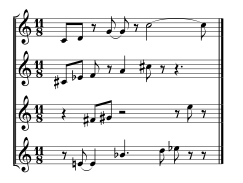
An interesting feature would be the option to specify a series of different length time spans to spread the notes, making the spreading of chords, voicings or serial structures (like hexachords) more controllable. Is it possible , with a keyword ?
Another possibility (maybe even better) is to spread the notes according to length sublists of each voice,
Best,
Julio
-
Is there any support for swing 8ths in Opusmodus playback ?
Best !
Julio


Windows Port?
in Pre Sales Questions
Posted
Me too !!